
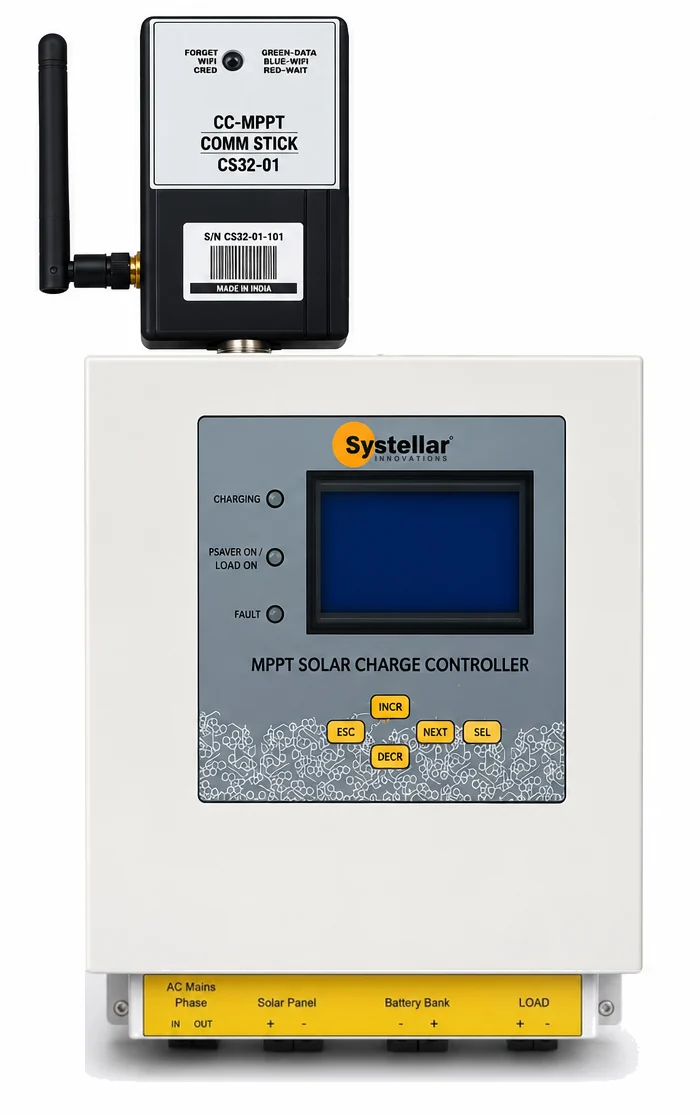
Overview
The CC-MPPT-Gen6 with Wi-Fi and Bluetooth connectivity is our flagship MPPT solar charge controller with remote monitoring built in. A plug-in Comm Stick connects it to your home Wi-Fi, so you can see solar power, battery voltage, charging current and the energy harvested each day on the Systellar web dashboard — from the browser on any phone or computer, wherever you are.
Everything else is the CC-MPPT-Gen6 you know: 50A or 75A, 12V to 48V battery banks, solar input up to 175V open-circuit voltage (Voc), every battery type set in the field, a 40A DC load output and a built-in power saver that runs your home inverter on solar. Designed and made in India by Systellar Innovations, Meerut.
What you see on the Systellar web dashboard
Sign in from any phone or computer browser. No software to install on your computer.
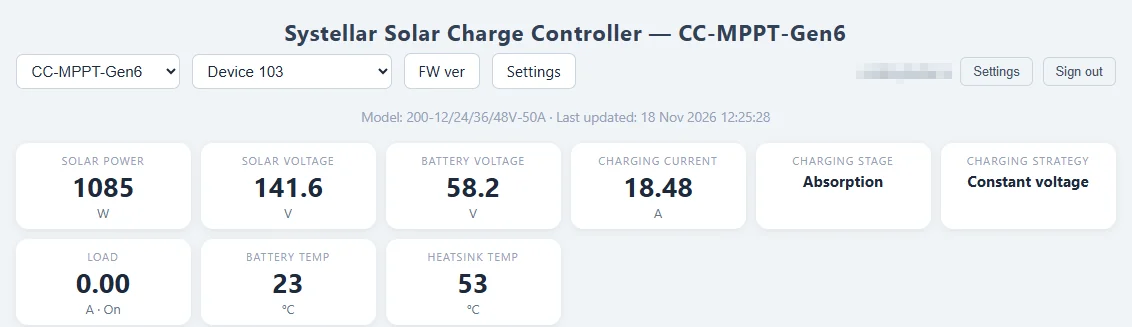
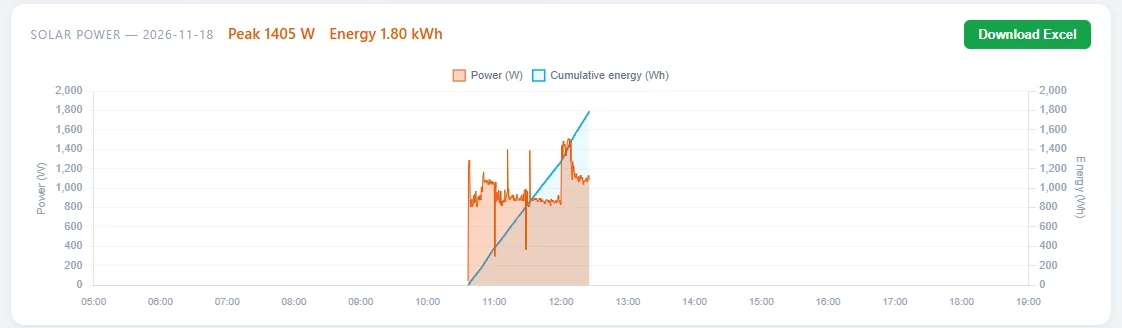
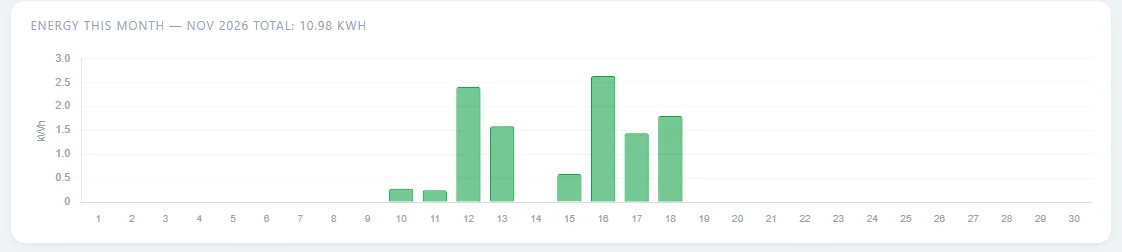
- Live readings — updated about every 30 seconds during the day and every 5 minutes at night.
- Today’s solar power curve and the energy harvested so far.
- Day-by-day energy history for the month.
- Download Excel — today’s solar power and energy for every 5-minute interval, plus a daily history of harvested energy, peak power and the highest and lowest battery voltage of each day.
- The controller’s settings, shown for reference (view only).
Why remote monitoring is worth having
- Know your solar is working — without going to the battery room. A drop in daily energy points early to dusty panels, new shade or a wiring problem, before the battery starts to suffer.
- See whether the battery is charging fully. Battery voltage, charging current and the charging stage (bulk, absorption, trickle) are on screen.
- Share it with your family or installer. Add viewers by email address and remove them whenever you like. Installers can keep an eye on their customers’ systems without a site visit.
- Faster help from Systellar. A Systellar support viewer is added when you register the controller, so our team can see the readings when you call. You can remove it at any time.
- Keep records. Download your solar data to Excel for your own analysis or reports.
- Improves over time. Systellar can install firmware improvements for the controller and the Comm Stick over the internet. The clock sets itself from the internet too.
Works with the inverter you already have
You don’t need to replace your home inverter to get solar and remote monitoring. The built-in power saver relay (250V AC, 20A — about 4 kW) cuts the mains to your inverter during the day so it runs on solar, and reconnects the mains when the battery runs low. Step by step: how to convert a normal inverter to a solar inverter (हिंदी में पढ़ें).
How to set it up — three steps
- Install the controller and plug the Comm Stick into its GX16 socket before connecting the battery.
- Connect it to your Wi-Fi — a one-time set-up over Bluetooth from your phone, standing near the controller. Written step-by-step instructions come with the controller.
- Register it to your account by scanning the QR code on the Comm Stick sticker, then sign in to the Systellar web dashboard from any phone or computer.
What you need
- A 2.4 GHz Wi-Fi network with internet access at the installation site (5 GHz-only networks are not supported), and its name and password.
- A smartphone with Bluetooth for the one-time Wi-Fi set-up.
Good to know
- Charging never depends on the internet. If the Comm Stick is unplugged or the Wi-Fi is down, the controller keeps charging normally; only the dashboard stops updating.
- Settings are changed near the controller — on its keypad, or from your phone over Bluetooth (PIN-protected). The dashboard only shows them, so nobody can change your charging settings over the internet.
- While a firmware update installs, charging pauses for a few minutes and then resumes by itself.
- This is a separate model. It has an additional communication card inside, so existing CC-MPPT-Gen6 controllers cannot be upgraded with the Comm Stick.
Which Gen6 should you buy?
| Feature | CC-MPPT-Gen6 | CC-MPPT-Gen6 with Wi-Fi & Bluetooth |
|---|---|---|
| Remote monitoring on phone / computer | — | Yes — Systellar web dashboard |
| Comm Stick (Wi-Fi + Bluetooth) | — | Included |
| Firmware updates over the internet | — | Yes |
| MPPT charging, 50A / 75A, 12V–48V, 175V Voc | Yes | Yes |
| All battery types, set in the field | Yes | Yes |
| Built-in power saver for home inverters | Yes | Yes |
| Optional RS-485 Modbus card | Yes | Yes |
| Price (incl. GST) | from ₹9,899 · see the Gen6 | from ₹13,399 |
Available models & solar panel capacity
| Model | Battery Voltage | Max Solar Panel Capacity |
|---|---|---|
| CC-MPPT-Gen6-200-50A-WiFi | 12V | 800 Wp |
| CC-MPPT-Gen6-200-75A-WiFi | 12V | 1200 Wp |
| CC-MPPT-Gen6-200-50A-WiFi | 24V | 1600 Wp |
| CC-MPPT-Gen6-200-75A-WiFi | 24V | 2400 Wp |
| CC-MPPT-Gen6-200-50A-WiFi | 36V | 2400 Wp |
| CC-MPPT-Gen6-200-75A-WiFi | 36V | 3600 Wp |
| CC-MPPT-Gen6-200-50A-WiFi | 48V | 3200 Wp |
| CC-MPPT-Gen6-200-75A-WiFi | 48V | 4800 Wp |
Both models support solar input up to 175V open-circuit voltage (Voc) on every battery bank voltage from 12V to 48V.
Buy the CC-MPPT-Gen6 with Wi-Fi and Bluetooth online
- CC-MPPT-Gen6-200-50A with Wi-Fi & Bluetooth (Comm Stick included) — ₹13,399 Buy Online →
- CC-MPPT-Gen6-200-75A with Wi-Fi & Bluetooth (Comm Stick included) — ₹16,499 Buy Online →
Prices include GST, with free delivery across India.
Optional accessories
Sold separately from the Systellar store. Prices include GST with free shipping across India.
- Battery Temperature Sensor — 3 m cable — temperature-compensated charging for lead-acid banks — ₹999 Add accessory →
- RS485 / Modbus Communication Card — data over MODBUS RTU for SCADA and data loggers — ₹2,999 Add accessory →
Technical Specifications
| Parameter | Specification |
|---|---|
| Technology | Triple Interleaved Synchronous Buck Converter MPPT |
| Conversion Efficiency | 97.3% – 98.8% (depending on battery voltage) |
| Battery Voltage | 12V / 24V / 36V / 48V (field programmable) |
| Max Solar Input Voltage (Voc) | 175V — all bank voltages 12V to 48V |
| Charge Current | 50A or 75A (model dependent) |
| DC Load Output | Up to 40A (output voltage = battery voltage) |
| Battery Chemistries | Lead Acid (SMF/FLA/Tubular/Gel), Li-ion, LiFePO4, Ni-Cd |
| Display | 128×64 pixel backlit graphic LCD, 8 rows, with Wi-Fi and Bluetooth status icons |
| Power Saver Relay | 250V AC / 20A (N/C contact) |
| Connectivity | Plug-in Comm Stick CS32-01 (GX16 connector): Wi-Fi 2.4 GHz (IEEE 802.11 b/g/n) and Bluetooth Low Energy (BLE) |
| Remote Monitoring | Systellar web dashboard: live readings, today’s power curve, daily energy history, Excel download, settings (view only); owner adds and removes viewers |
| Dashboard Update Interval | About 30 seconds by day, 5 minutes at night |
| Wi-Fi Set-up | One-time, over Bluetooth from your phone (written instructions supplied) |
| Settings from Your Phone | Over Bluetooth near the controller, PIN-protected: charging voltages, absorption time, low-cut voltage, max charging current, power saver thresholds, DC load timer, LED mode, and lead-acid equalizing & temperature compensation |
| Firmware Updates | Over the internet, for the charge controller and the Comm Stick |
| Date & Time | Set automatically from the internet |
| Weight | 5.5 kg (charge controller) |
| Dimensions | 300 mm × 225 mm × 120 mm (charge controller) |
| Comm Stick Size & Weight | 70 mm × 110 mm × 32 mm (W × H × D), 150 g |
| Idle Current (Battery) | Max 60mA |
| Communication (Optional) | RS-485 / MODBUS RTU with the RS-485 adapter card |
| Temperature Compensation | Optional battery temperature sensor, 3 m cable (lead acid) |
| Operating Temperature | 0°C to 45°C |
| Warranty | 2 year manufacturer warranty (charge controller and Comm Stick) |
| Certification | ISO 9001:2015 (company-wide) · Made in India |
Order today
Buy online from our Shopify store with free delivery across India, or contact us via the enquiry form for bulk and dealer orders.
📞 Call / WhatsApp: +91-9568004455
📧 Email: info@systellar.in
Frequently Asked Questions (FAQ)
Can I add the Comm Stick to my existing CC-MPPT-Gen6?
No. The Wi-Fi model has an additional communication card inside the charge controller, so the Comm Stick works only with the CC-MPPT-Gen6 with Wi-Fi and Bluetooth connectivity. Existing Gen6 controllers keep working exactly as before; for SCADA or data-logger connections they can use the optional RS-485 Modbus card.
Do I need to install an app to see my solar data?
No. You sign in to the Systellar web dashboard from the browser on any phone or computer — at home, at work or while travelling.
How do I connect the controller to my Wi-Fi?
It is a one-time set-up over Bluetooth from your phone, done standing near the controller. Written step-by-step instructions come with the controller, and our support team can help. You need a 2.4 GHz Wi-Fi network with internet access at the site; 5 GHz-only networks are not supported.
What happens if the Wi-Fi or internet goes down?
Charging carries on normally — the controller does not depend on the Comm Stick, the Wi-Fi or the internet. Only the dashboard stops updating, and it catches up when the connection returns. The energy history for the time it was offline may be incomplete.
Can I change the controller's settings from the dashboard?
The dashboard shows the settings but does not change them, so nobody can change your charging settings over the internet. When you are near the controller, you can change them on its keypad or from your phone over Bluetooth (protected by a PIN): end-of-charge, trickle and re-bulk voltages, absorption time, low-cut voltage, maximum charging current, power saver turn-on and turn-off thresholds, the DC load timer and the blue LED mode — plus equalizing settings and temperature compensation for lead-acid batteries.
Who can see my controller's data?
You, as the owner, and the people you add as viewers by their email address — for example family members or your installer. You can remove them at any time. A Systellar support viewer is added automatically when you register the controller, so that we can help you with any device issue; you can remove it from your dashboard at any time.
How often does the dashboard update?
About every 30 seconds during the day and every 5 minutes at night. You can also download the data as an Excel file.
Will it still convert my normal inverter into a solar inverter?
Yes. The Wi-Fi model keeps the Gen6's built-in power saver relay (250V AC, 20A — about 4 kW), which runs your existing home inverter on solar during the day and reconnects the mains when the battery runs low.
Note: product specifications are subject to change for continuous product enhancement. Please contact Systellar for the latest specifications.